Code Scann
- This lab walks through configuring GitHub’s core application security features.
- You will enable and tune: Code Scanning (CodeQL), Secret Scanning (incl. Push Protection), and Dependency Review.
- Includes setup, workflow authoring, alert triage, automation, and integration with branch protection.
1. Why These Security Features Matter
Security features help you shift-left by:
- Automatically finding vulnerabilities (CodeQL semantic analysis)
- Preventing leaked credentials before they land in
main(Secret Scanning + Push Protection) - Catching risky dependency changes during code review (Dependency Review)
- Reducing mean-time-to-detect (MTTD) with continuous scanning
- Standardizing security gates via required status checks
- Enabling measurable SLAs for remediation (alerts, severity, timelines)
- Supporting audit & compliance with immutable alert history
2. Prerequisites
| Area | Requirement |
|---|---|
| Permissions | Repository Admin (to enable security & analysis) |
| Repo Visibility | All features free for public repos. Private repos need GHAS for CodeQL & Secret Scanning. |
| Branch Strategy | Protected default branch (e.g. main) |
| Code Languages | CodeQL supports Java, Kotlin, C/C++, Go, C#, Python, Ruby, JS/TS, Swift, etc. |
| CI | CodeQL workflows consume Actions minutes |
Note
If a language is not auto-detected specify explicitly (languages: ['java','python']).
3. Enable Security & Analysis Features
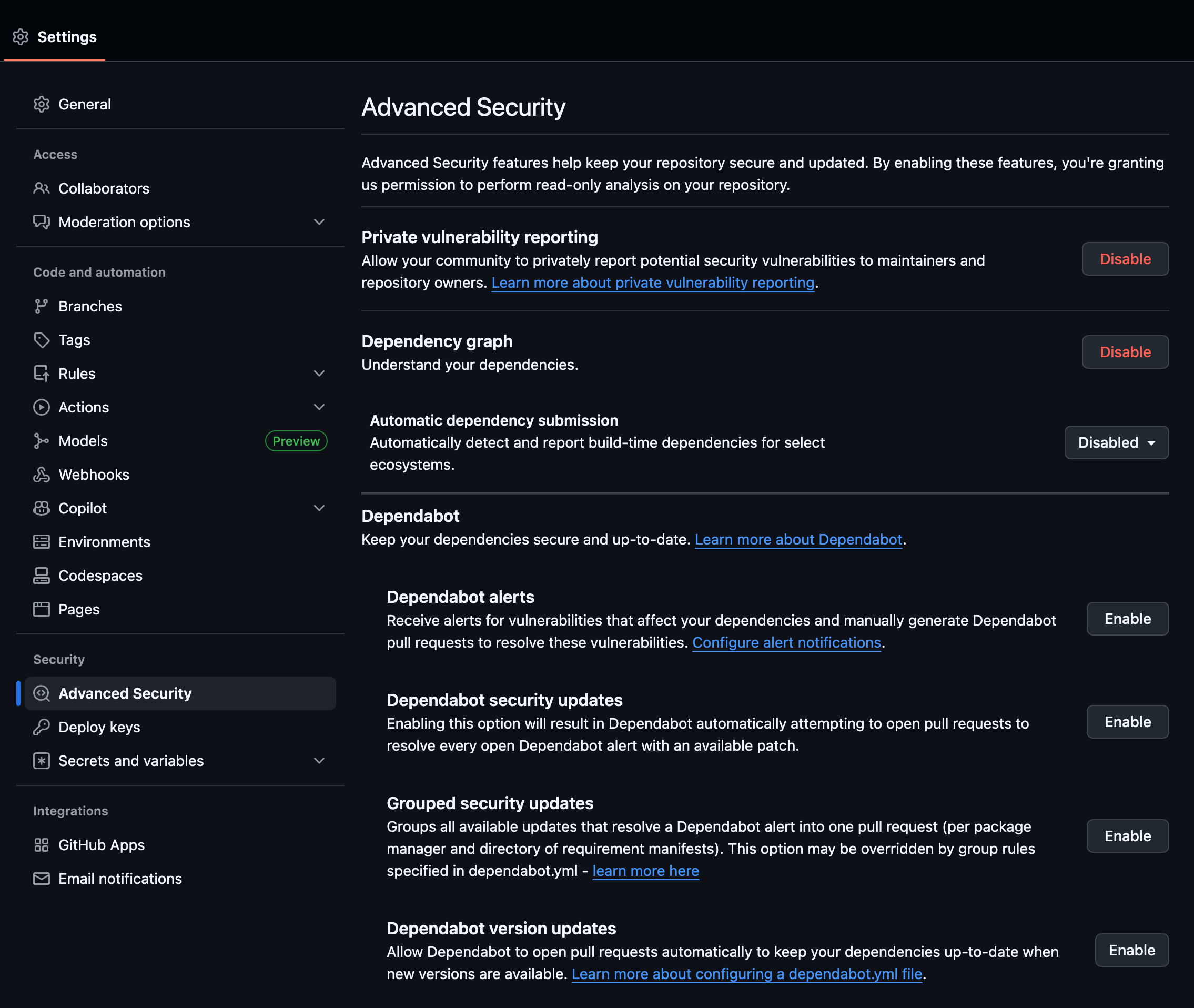
- Navigate to the repository on GitHub.
- Settings → Advanced Security → Code scanning.
- Enable what ever you wish based upon your needs:
- Dependency graph
- Dependabot alerts
- Dependabot security updates (optional)
- Code scanning (Default or Advanced)
- Secret scanning
- Secret scanning: Push protection
- Wait for activation banners.
Note
Dependency Graph must be on for Dependency Review context.
4. Code Scanning (CodeQL)
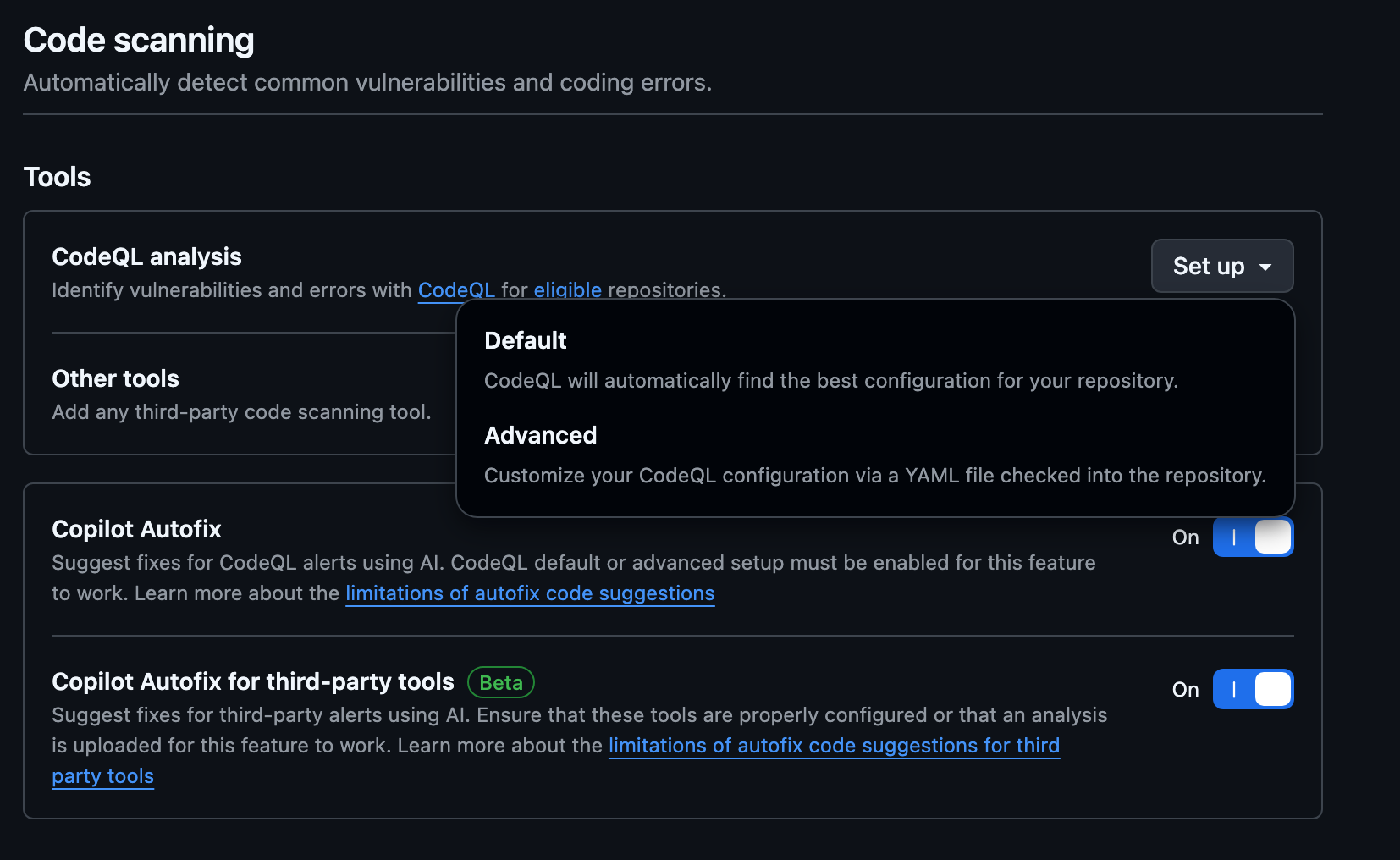
4.1 Modes
| Mode | Use Case | Effort |
|---|---|---|
| Default | Fast enable, standard query packs | Very Low |
| Advanced (workflow) | Custom build, multi-language, custom packs | Medium |
| SARIF Upload | Integrate external SAST tools | Variable |
4.2 Quick Start (Default)
- Security tab → Code scanning alerts.
- Set up code scanning → Default → Enable CodeQL.
- Initial analysis runs automatically.
- Review alerts when finished.
4.3 Advanced Workflow
Create .github/workflows/codeql.yml:
name: CodeQL

on:
    push:
        branches: ["main"]
    pull_request:
        branches: ["main"]
    schedule:
        - cron: '0 3 * * 1'

jobs:
    analyze:
        runs-on: ubuntu-latest
        permissions:
            actions: read
            contents: read
            security-events: write
        strategy:
            fail-fast: false
            matrix:
                language: [javascript, python]
        steps:
            - uses: actions/checkout@v4
            - name: Initialize CodeQL
                uses: github/codeql-action/init@v3
                with:
                    languages: ${{ matrix.language }}
                    # packs: codeql/javascript-queries@latest,codeql/python-queries@latest
                    # config-file: ./.github/codeql/codeql-config.yml
            - name: Autobuild
                uses: github/codeql-action/autobuild@v3
            - name: Analyze
                uses: github/codeql-action/analyze@v3
                with:
                    category: "/language:${{ matrix.language }}"
4.4 Custom Queries
Create .github/codeql/codeql-config.yml:
config-file in init step. Tip
Add `security-extended` after validating baseline noise.
4.5 Manual Build Example
4.6 Triage Alerts
- Security → Code scanning alerts.
- Filter by severity / language.
- Open alert → inspect data flow.
- Fix or Dismiss (False positive, Won’t fix, Used in tests, Acceptable risk).
- Link fix via PR.
4.7 Suppress in Code (last resort)
4.8 Enforce via Branch Protection
Add CodeQL checks as required status checks after first successful run.
5. Secret Scanning
5.1 Push Protection Flow
- Developer pushes commit with secret.
- GitHub blocks push; shows remediation.
- Developer removes secret (preferred) or bypasses with justification (audited).
5.2 Custom Patterns (GHAS)
Security → Secret scanning → Custom patterns → New pattern. Example regex: INT-API-[0-9A-F]{32}
Warning
Keep patterns specific to avoid false positives.
5.3 Triage
For each alert: verify exposure, revoke/rotate, optionally rewrite history, resolve with reason.
5.4 SLA Guidance
| Severity | Example | SLA |
|---|---|---|
| High | Cloud root keys | 4 hours |
| Medium | Internal API tokens | 1 business day |
| Low | Test credentials | 3 days |
6. Dependency Review
6.1 Use
Shows added/removed/updated dependencies, vulnerabilities, licenses in PR.
6.2 Workflow (optional gate)
.github/workflows/dependency-review.yml:
name: Dependency Review
on: [pull_request]
permissions:
    contents: read
    pull-requests: read
jobs:
    review:
        runs-on: ubuntu-latest
        steps:
            - uses: actions/checkout@v4
            - uses: actions/dependency-review-action@v4
                with:
                    fail-on-severity: high
                    # allow-licenses: MIT,Apache-2.0
                    # deny-licenses: GPL-3.0
                    # comment-summary-in-pr: true
6.3 Dependabot Updates
.github/dependabot.yml:
version: 2
updates:
    - package-ecosystem: npm
        directory: /
        schedule:
            interval: weekly
        open-pull-requests-limit: 5
    - package-ecosystem: pip
        directory: /
        schedule:
            interval: weekly
7. Branch Protection Integration
| Feature | Check Name Example | Action |
|---|---|---|
| CodeQL | CodeQL / Analyze (javascript) | Require |
| Dependency Review | Dependency Review / review | Require |
| Secret Scanning | (none) | Rely on push protection |
Add checks under Branch protection → Require status checks.
8. Alert Review Workflow
| Step | Action | Owner |
|---|---|---|
| Detect | Scan creates alert | Automation |
| Triage | Validate severity | Security Champion |
| Assign | Link issue/PR | Eng Lead |
| Remediate | Patch / rotate | Developer |
| Verify | Confirm closure | Security |
| Report | Metrics & trends | Security Ops |
Tip
Tag security when dismissing or suppressing findings.
9. Advanced Topics
9.1 SARIF Upload (3rd Party)
9.2 Secret Pattern Anchoring
\bAKIA[0-9A-Z]{16}\b
9.3 Noise Reduction
- Start with default packs only.
- Audit dismissals; convert recurring false positives into custom query tweaks.
- Incrementally tighten severity gates.
9.4 License Policy
Use dependency review action allow-licenses / deny-licenses to enforce governance.
10. Metrics
| Metric | Target |
|---|---|
| CodeQL MTTR | < 14 days |
| Secret Exposure Window | < 1 hour high severity |
| Vulnerable Dependency Introduction | 0% High severity |
| False Positive Rate | < 10% |
11. Troubleshooting
| Issue | Cause | Fix |
|---|---|---|
| No CodeQL alerts | Wrong language / no runs | Verify workflow triggers & languages |
| Missing status check | Name mismatch | Copy exact check name post-run |
| Push not blocked | Pattern gap / bypass | Add custom pattern, review bypass logs |
| Slow CodeQL job | Large build | Cache deps / split languages |
| Dependency Review missing | Dependency graph off | Enable in settings |
Note
Some alerts appear only after first successful default branch scan.
12. Next Steps
- Promote workflow & config to template repo.
- Add CODEOWNERS for
.github/workflows/**. - Export alerts weekly (governance dashboard).
- Add security KPIs to sprint review.
By completing this lab you established a proactive security baseline using native GitHub: CodeQL, Secret Scanning, and Dependency-aware reviews. Iterate on queries, secret patterns, and gating policies as the codebase evolves.