GitHub Rulesets
- Rulesets are the modern way to enforce protections on branches across a repository (or organization).
- Use a branch ruleset to standardize requirements like PR reviews, status checks, commit signing, and more.
Understanding Ruleset / Branch Protection
Branch protection rules help maintain code quality by:
- Preventing direct pushes to important branches like
mainordevelop - Requiring pull request reviews before merging code
- Enforcing status checks from CI/CD pipelines
- Restricting who can push to protected branches
- Maintaining a clean commit history with merge strategies
- Ensuring code review processes by forcing pull request reviews
- Enabling automated testing to catch issues early
- Maintaining a clean commit history with merge strategies
- Enforcing coding standards through automated checks
- Preventing accidental deletions of important branches
1. Create Ruleset
- Open the repository on GitHub and go to Settings
- In the sidebar, select Rules → Rulesets
- Click New ruleset and choose New Branch Ruleset as the target
- Give the ruleset a meaningful name (for example,
Branch Protections - main) - Set Enforcement status → Active / Disabled
- Set Target branches → Add target (which branches the rules apply to):
- Configure Bypass list (optional):
- Add specific users/teams that may bypass, and (if required)
Danger
Bypass rules should be used sparingly and only for trusted users or teams. Atera Does have bypass rules
2. Approvals
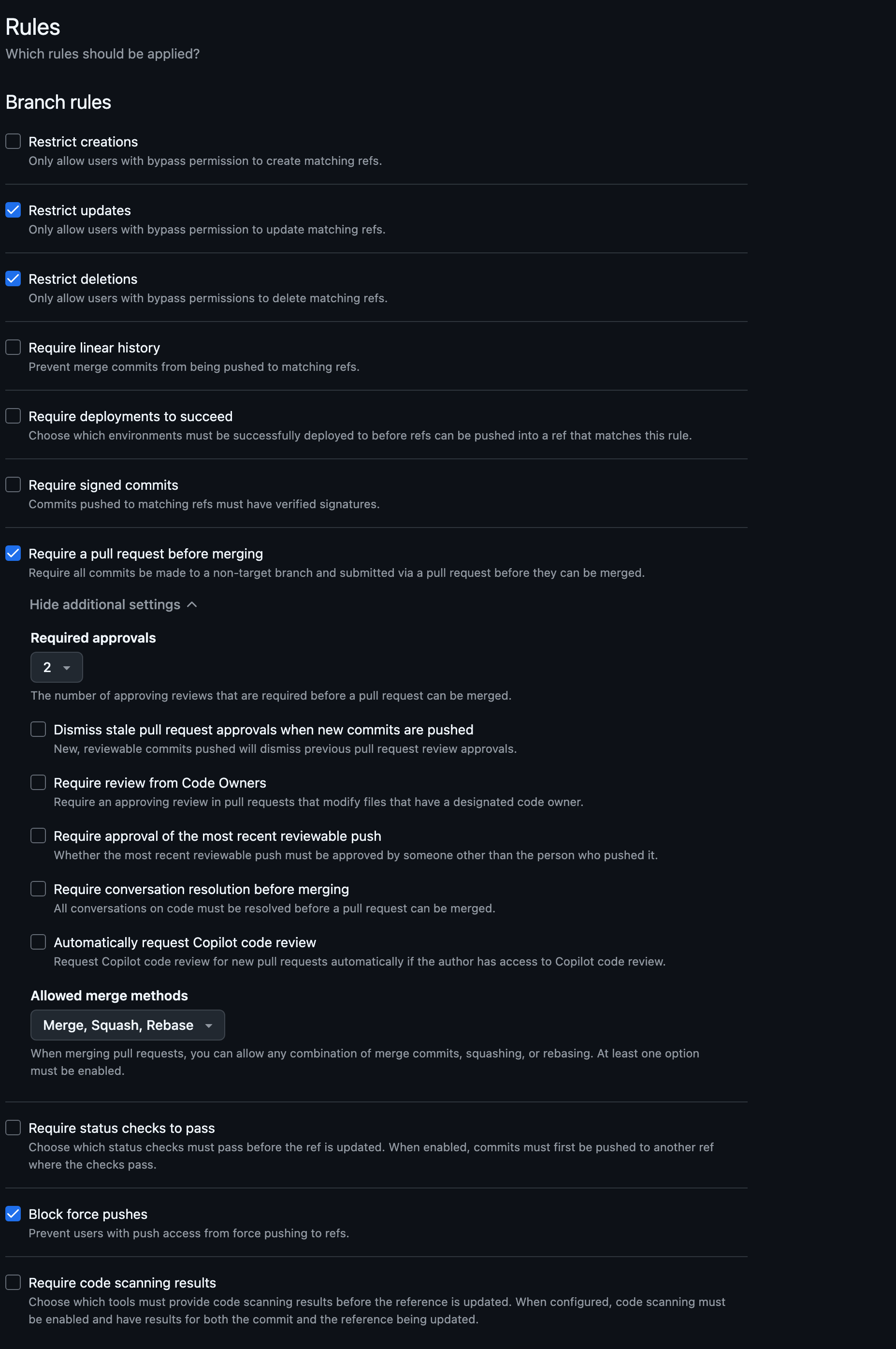
- Set the Require a pull request before merging → Required Approvals
3. Merge Methods
-
Set the Allowed merge methods
Squash
- Recommended for most teams
- Combines all commits into a single commit
- Keeps main branch history clean
- Easy to revert changes
- Provides a clear commit history
- Allows for better collaboration and code review
- Simplifies the process of reverting changes
Rebase
- Replays commits without creating merge commits
- Creates linear history
- Good for small, clean changes
- Allows for easier bisecting of changes
- Supports interactive rebasing
- Requires careful management of commit history
- Not recommended for large feature branches
Merge committing
- Creates merge commits that preserve branch history
- Good for feature branch workflows
- Allows for more complex merge scenarios
- Requires careful management of merge conflicts
- Not recommended for small changes
Merge Strategy Recommendations
Workflow Type Recommended Strategy Benefits Feature branches Squash merge Clean main branch history Hotfixes Rebase merge Fast-forward integration Release branches Merge commit Preserve branch context Small changes Squash merge Reduce commit noise
4. Status Checks
- Set the Require status checks to pass → Require status checks to pass before merging
- Add the required checks
Require status checks to pass before merging
- This ensures that all required checks pass before merging a pull request.
- It helps maintain code quality and prevents broken code from being merged.
- You can select specific checks like:
ci/buildci/testsecurity/code-scanningquality/lintAtera/specific_task
5. Branch Restrictions
- Those are several restrictions you can apply to branches
- Review the rules screen and you can see all the different configured restrictions
Task: Create rules for Development Branch
Pattern: develop or dev
Required reviewers: 1
Status checks: CI tests only
Allow force pushes: No
Task: Create rules for Release Branches
Pattern: release/*
Required reviewers: 2
Status checks: Full test suite
Restrict pushes: Release managers only
Task: Create rules for Feature Branches
Pattern: feature/*
Required reviewers: 1
Status checks: Basic CI
Allow force pushes: Yes (for development)
6. Copilot Code Reviews
- Set the Require a pull request before merging → Automatically request Copilot code review